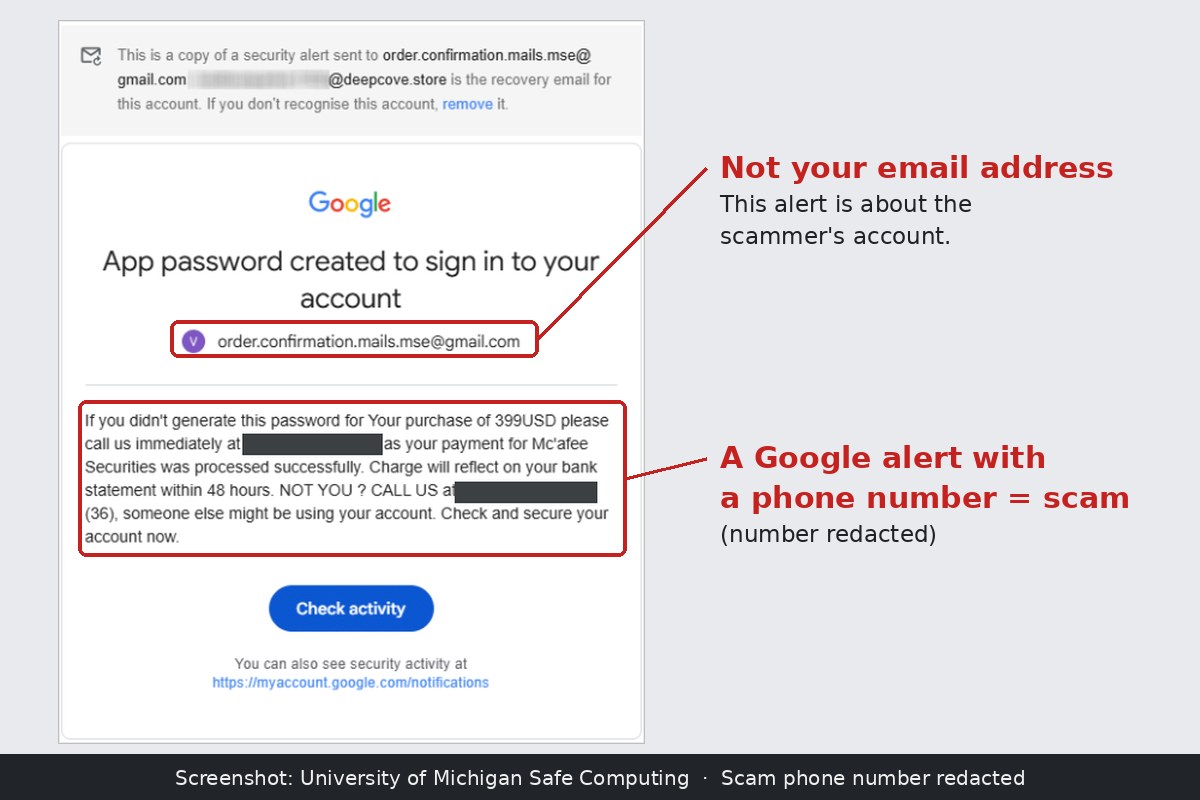
What the email looks like
It arrives looking like a normal Google security notice. The headline reads “App password created to sign in to your account.”
Then comes the scary part. In the University of Michigan’s example, the message says: “If you didn’t generate this password for Your purchase of 399USD please call us immediately.” It claims a payment for “Mc’afee Securities” went through, and ends with “NOT YOU ? CALL US,” followed by a phone number.
The odd spelling and punctuation are a clue. Google doesn’t write like that. A scammer does.
How the trick works
Google lets people make something called an app password. It’s a 16-digit code that lets an older app or device sign in to a Google account. Google’s own help page says app passwords “aren’t recommended and are unnecessary in most cases.”
When you make one, you give it a name, like “Kitchen tablet.” Google then sends a security email saying a new app password was made, and it repeats that name.
That’s the loophole. According to U-M’s Safe Computing team, the scammer typed a fake $399 McAfee bill and a phone number into the name box on their own Google account. Google’s systems did what they are built to do: they sent a real, signed security alert that repeated the scammer’s words.
Think of it like this: It’s like a crook ordering a real birthday cake from a real bakery and asking for “Call 555-0100 about your overdue bill” to be written in the icing. The cake really comes from the bakery. The message doesn’t.
Why spam filters didn’t catch it
In the case U-M looked at, Google sent the alert to an address the scammer controlled. From there it was forwarded through the hacked email system of a high school (it ran on Microsoft 365) and on to university inboxes.
Because the email was a real Google message with valid security stamps, U-M says it passed all of the university’s email security checks.
The dead end is on purpose
Careful people often click the “Check activity” button to see what’s going on. That’s normally good advice.
Here, U-M says, the real Google links just take you to your own account, where everything looks normal. That’s because the alert was about the scammer’s account, not yours. U-M calls this “an intentional dead end.” It leaves one obvious next step: calling the number. That’s exactly what the scammer wants.
No University of Michigan account was broken into, U-M says. The whole point was to get people on the phone.
What happens if you call
A security company called Augment Intent describes the usual phone script. It’s a refund scam:
- A friendly “agent” offers to cancel the $399 charge.
- They ask you to install a program that lets them control your computer remotely, to “process the refund.”
- They claim they accidentally refunded you too much.
- They pressure you to send the difference back by bank transfer, gift cards or cryptocurrency.
There was never a charge, and there’s no refund. The money you send is real.
This kind of scam is big business. Augment Intent, citing the FBI’s Internet Crime Complaint Center, says the FBI received 36,002 tech support scam complaints in 2024, with reported losses of about $1.46 billion.
How to spot it
- A phone number in a Google security email is the giveaway. Treat any “call us” message as a scam, no matter how official the email looks.
- Look at the email address the alert is about. Augment Intent says the alert names an account email address that is not yours. Most people never look at that line.
- Don’t trust the bill. Check any real charge by logging in to your bank or card account yourself, not through the email.
What to do instead
- Don’t call, and don’t reply. You can delete the email.
- Check your Google account the safe way. Type myaccount.google.com/notifications into your browser yourself. The genuine alert even says you can see your security activity there. Augment Intent says Google gives the same advice for any security email you aren’t sure about.
- Report it. In Gmail, use “Report phishing.” You can also report scams to the FBI at ic3.gov.
If you already called
Don’t be embarrassed. These emails are built to fool careful people. Augment Intent’s advice if you let someone connect to your computer:
- Disconnect the computer from the internet (unplug it or turn off Wi-Fi).
- Run a full security scan.
- Change your passwords using a different device, like your phone.
- Call your bank right away, using the number on the back of your card.
Sources
- University of Michigan Safe Computing, “App password created to sign in to your account” (phishing alert), Oct. 6, 2026: safecomputing.umich.edu
- Augment Intent Security Group, “Real Google Alerts Are Carrying Fake $399 Invoices: How the App-Password Scam Works,” Nov. 2, 2026: augintent.com
- Google Account Help, “Sign in with app passwords”: support.google.com
- FBI Internet Crime Complaint Center (reporting): ic3.gov